
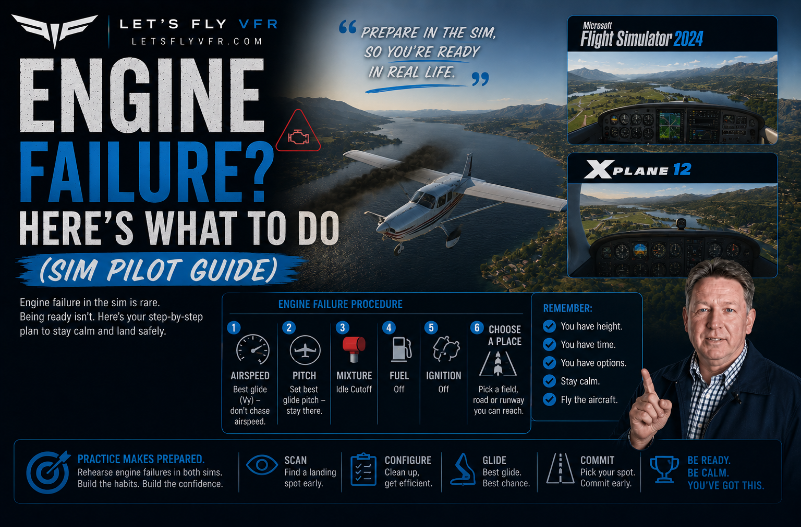
ENGINE FAILURE! You’ve Lost the Engine — Now What? | X-Plane 12
The FAA’s current Airplane Flying Handbook is particularly useful here because it stresses the first priorities after a simulated power failure: maintain control, establish best-glide speed, select a landing area, and manage the glide rather than immediately becoming fixated on restarting the engine. (Federal Aviation Administration)
ENGINE FAILURE! You’ve Lost the Engine – Now What?
You’re flying along in your Cessna 172. your enjoying the amazing scenery around you so everything is normal. The engine is humming away happily with all temps and pressures looking perfect.
You’re enjoying the incredible X-Plane 12 Clouds and admiring the world thinking the world is amazing. You’re probably thinking about the next waypoint, the next radio call or where you’re going to land.
And then…
The engine stops. Just silence! Your brain goes into WHAT!
No warning – No gradual reduction in power – Just Silence!
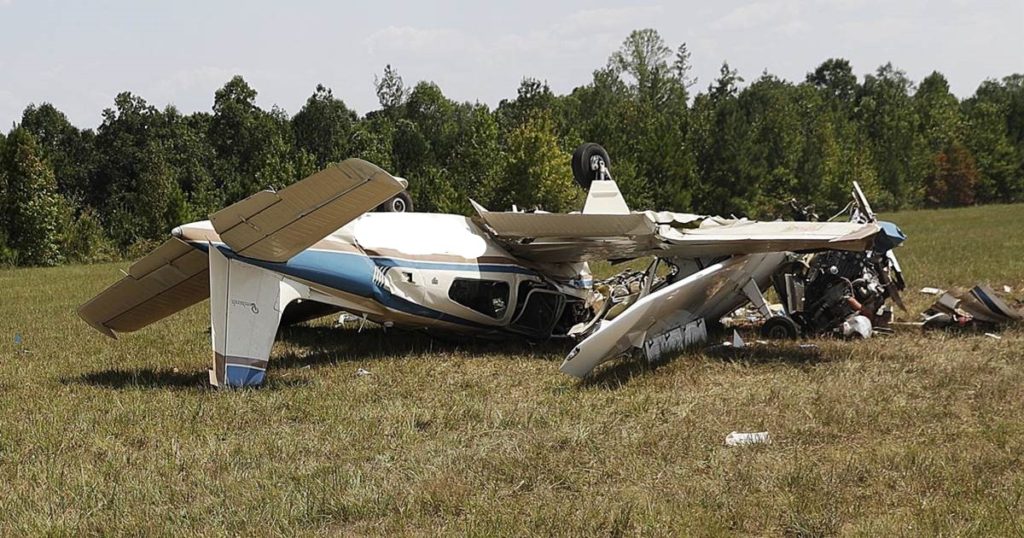
The propeller is slowing as the aircraft slows and the the aircraft is no longer climbing.
The speed continues to drop from your cruise VY climb or was it a cruise you were in? It doesn’t matter the engine has abandoned you! And suddenly you’re not flying a powered aircraft anymore. You’re flying a glider.
What do you do? That’s exactly what we’re going to practise in this lesson.
And we’re going to do it in X-Plane 12, where you can deliberately create an engine failure, make mistakes, reset the aircraft and try again. Because an engine failure isn’t something you should only read about. It’s something you should practise recognising and responding to.
(Set up failures in the aircraft configuration screen – Select altitudes or times before the failure happens!)
First: Don’t Panic.
This is the first thing I want to get into your head. When the engine quits, your first job isn’t:
“Why did the engine stop?”
Your first job is:
Fly the Aircraft!
Aviate – Navigate – Communicate!
This is always the pilots mantra!
Both real world & flight simulator!
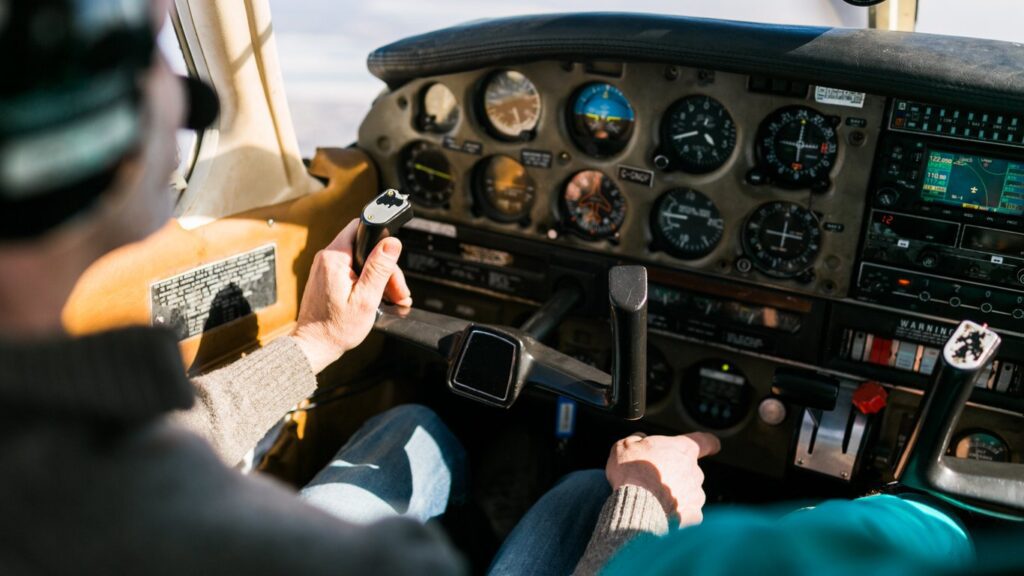
The FAA’s emergency-landing guidance places maintaining aircraft control and establishing the appropriate glide speed at the top of the priority list. (Federal Aviation Administration)
That makes perfect sense. The aircraft doesn’t care why the engine stopped. It is now descending.
This is where you MUST have memorised the important speeds for your aircraft.
You must know your Best Glide Speed (VG)!
X-Plane 12 Typical VG – (Not for real world use).
| Aircraft | Best Glide Speed (Vg) |
|---|---|
| Cessna 172S Skyhawk | 68 KIAS |
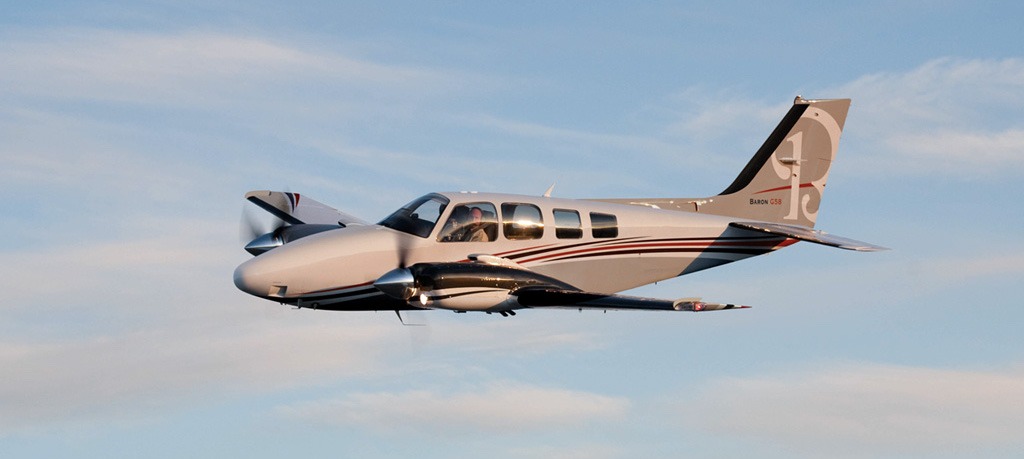
| Beechcraft Baron 58 | 115 KIAS |
| Cirrus SR22 | 88 KIAS at 3400 lb gross weight |
Vg (Best Glide Speed) is the airspeed that gives you the maximum glide distance for every foot of altitude lost after an engine failure. Think of it as the speed that provides the best lift-to-drag ratio (L/D max).
Its surprising to new pilots that flying faster does not give more distance but its a proven fact – get to VG as soon as you can and survive.
In practice:
- Too fast = extra drag, steeper descent.
- Too slow = increased induced drag, steeper descent.
- At Vg = greatest distance covered per unit of altitude lost.
Approximate Glide Range for X-Plane 12.
These are rough still-air figures:
| Aircraft | Glide Ratio | Distance from 10,000 ft AGL |
|---|---|---|
| C172 | ~9:1 | ~15 NM |
| Baron 58 | ~12:1 | ~20 NM |
| SR22 | ~11:1 | ~18 NM |
Maintain Control of the Aircraft & Your Emotions.
You need to control:
AIRSPEED is critical now the thrust has gone! Your Best Glide Speed (Vg) is what you need to attain! If you have excess speed in cruise when the engine fails use the energy you have in additional speed (knots) above your Vg and climb to get altitude remembering to be ready to get your nose down before you get to Best Glide Speed (Vg).
- Airspeed –
- Attitude
- Direction
- Glide path
- Landing area
* Aviate – Navigate Communicate!
Then troubleshoot.
Note: There are quite a lot of “MAYDAY MAYDAY MAYDAY” YouTube Videos – Please disregard most of these because they sound panicked and expect the tower etc to fix their problem. It’s not going to happen.
Look for real pilots & their emergency flights and take notes on how calm most are during the whole landing. Screaming into a microphone is most likely just a YouTube click bait video. 🙂




The Biggest Simulator Mistake.
Here’s what I see happening in simulator training. The engine quits. The pilot immediately starts looking for the problem.
They stare at:
- Engine gauges
- Fuel quantity
- Mixture
- Magnetos
- Throttle
- Electrical switches
Meanwhile…
The aircraft is descending.
That’s backwards!
You have plenty of time to investigate the cause if the aircraft is under control.
If you lose control while trying to diagnose the engine, the engine problem becomes the least of your worries. Sadly this seems to take pilots lives! (Aviate – Navigate – Communicate)
The First Few Seconds Matter.
Imagine the engine suddenly stops at 3,500 feet. The aircraft was previously climbing or cruising. Without power, the aircraft’s energy state changes.
If you simply hold the previous pitch attitude, airspeed will decay. So the nose needs to come down. You need to establish the aircraft’s appropriate best-glide configuration and speed.
The FAA specifically recommends allowing the aircraft to slow to best glide if it was above that speed, or lowering the nose immediately if the failure occurs at or below best glide speed. (Federal Aviation Administration)
The first few seconds are about one thing:
Get the aircraft flying correctly.

Best Glide Speed.
This is one of the most important numbers you should know for your aircraft.
Best glide speed is the speed that gives you the aircraft’s optimum glide performance under the applicable conditions.
In simple terms:
It gives you the best chance of reaching something useful.
But here’s something important:
There isn’t one universal best-glide speed.
A Cessna 172 has its own published information. A Piper Cherokee has different characteristics. A different aircraft will have different numbers again.
So don’t simply memorise a number from someone else’s simulator setup.
Know the aircraft you’re flying.
Why Not Just Pull the Nose Up?
This is a critical lesson.
You lose the engine.
You see the runway behind you.
You think:
“I need to stretch the glide.”
So you pull back then the the airspeed falls. The aircraft may appear to glide more slowly so, you think you’re buying time. But you’re actually sacrificing glide performance.
The FAA specifically warns that trying to stretch a glide by applying back pressure can result in a stall or a landing short. (Federal Aviation Administration)
The rule is simple:
Don’t trade airspeed for hope.
Fly the appropriate glide speed.
You’re Now a Glider Pilot.
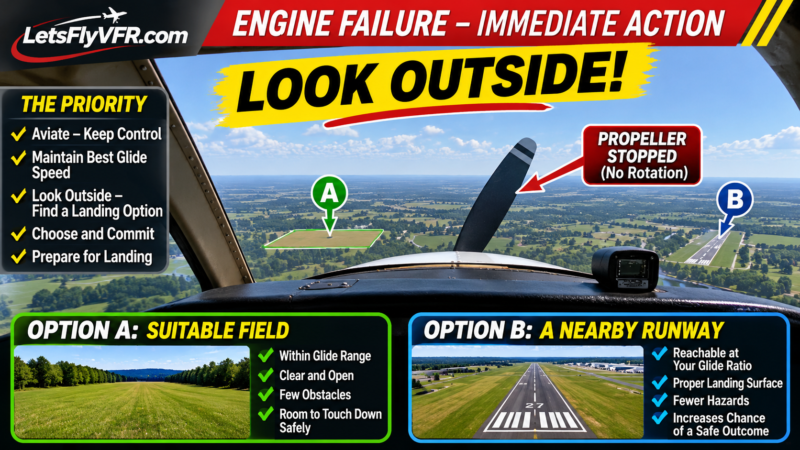
This is the mental shift I want simulator pilots to make is once the the engine has stopped. Forget the engine for a moment. You are now flying a glider.
Ask:
Where can I land?
Not:
“Where was I planning to go?”
Not:
“Can I get back to the airport?”
But:
“What can I safely reach from here?”
That is a completely different question.
Look Outside!
This is another one of our recurring LetsFlyVFR lessons. Don’t stare inside the cockpit you must look outside and once your speed is set and trimmed you need to be looking for a place to land!
In my own flight training my instructor gave me a quick visual reference guide for this situation that you may adapt for you simulator flying. I was flying the Jabiru 170 which is a light sport aircraft and looks like a smaller Cessna 172 as a reference.
His guide was: Look out the window and anything that is halfway down the strut you can make as a quick guide. Remember especially at lower altitudes and most importantly on
take-offs where is very crucial and time is limited.
Look outside.
You need to find:
- Runways
- Roads
- Fields
- Open areas
- Airports
- Clearings
- Other suitable landing areas.
Additional tip more for real world from my training is especially in fields look quickly for shadows from power polls. Common in country Australia to have power lines cross farmland. Its not the pole you need to worry about but the power line running between them.
Your altitude gives you options.
But those options disappear rapidly.
So:
Look outside early.
Pick a Landing Area!
Once you’ve established the glide, start selecting where you’re going to land. Ideally, you’re looking for a suitable area that you can reach while maintaining control.
A runway is obviously attractive but don’t become obsessed with reaching an airport if a safer landing area is available closer to you.
The FAA’s simulated emergency-landing guidance emphasises selecting a suitable landing area and planning the approach while maintaining the glide. (Federal Aviation Administration)
The Most Important Question!
Ask:
“Can I make it?”
Not:
“Can I make the runway if everything goes perfectly?”
Instead:
“Can I comfortably reach the landing area while maintaining the appropriate glide speed and a manageable approach?”
If the answer is no:
Pick something else.
This is why you should identify your landing options early.
Don’t Change Your Mind Every Five Seconds

Here’s another common simulator mistake.
The pilot picks a field – Then sees another field – changes direction costing time and altitude – Then sees a road & changes direction again – Then sees the airport & turns again.
Suddenly they’re manoeuvring all over the sky. That’s not good energy management. Once you’ve selected a suitable landing area:
Commit to it unless circumstances clearly make another option better.
The FAA warns about the hazards of last-minute changes, particularly excessive manoeuvring at low altitude. (Federal Aviation Administration)
You Still Have an Engine Restart Option.
Now we can start thinking about the cause.
Depending on the aircraft and emergency checklist, you may have items such as:
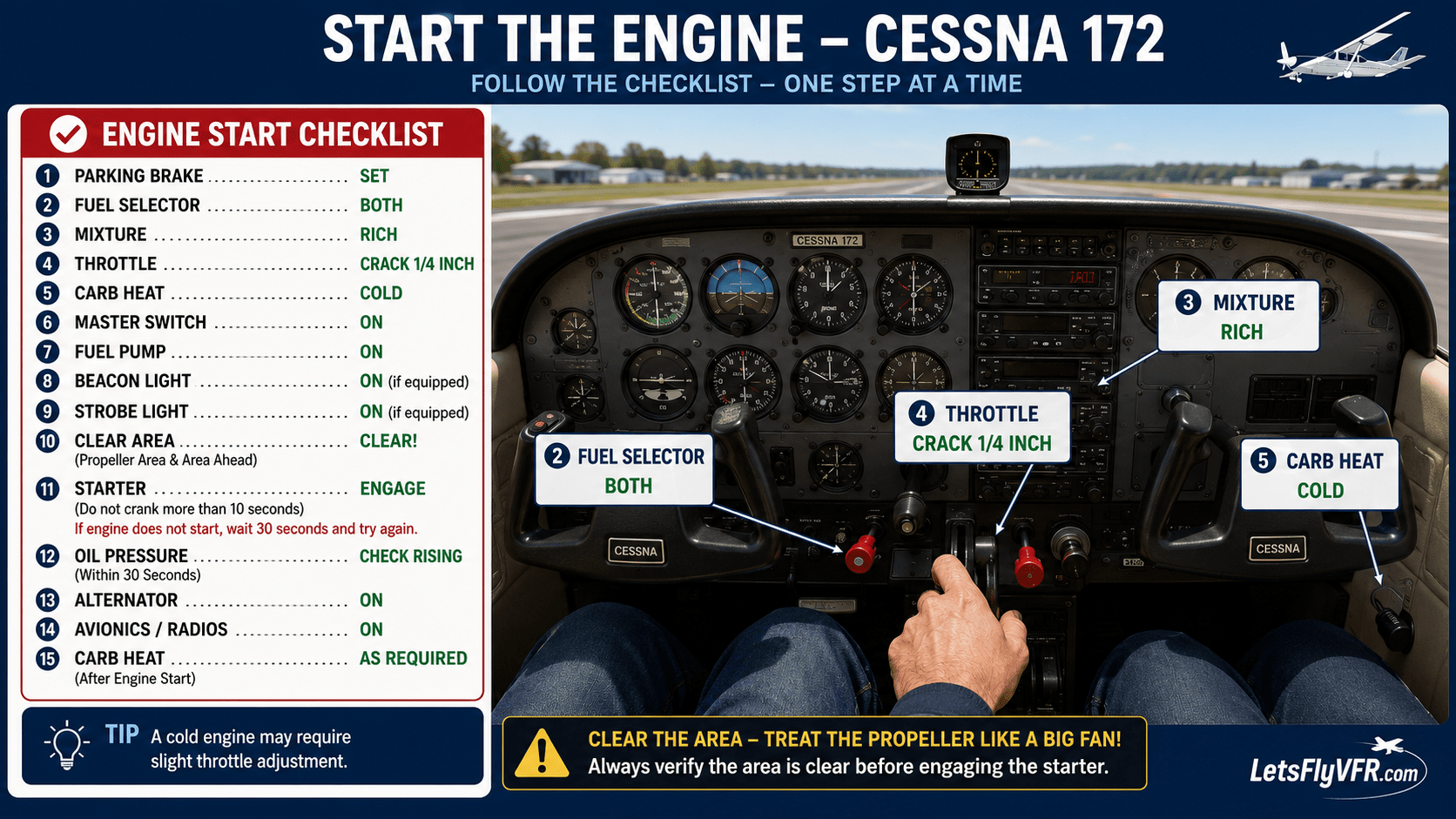
- Fuel selector – Has the tank run dry and your other tank has fuel? – Change tank and restart!
- Mixture – Needs to be richer – Engine Exhaust Temp High indication. Increase mixture.
- Throttle – Has it moved to idle? Adjust and restart.
- Carburetor heat, if applicable – Ice can stop engines so in cold weather have your carburettor heat on! If you lose an engine to ice then its likely not going to have time to melt but try!
- Magnetos/ignition – Check on.
- Primer
- Fuel pump – Turn on – this can help if the engine fuel pump has failed. Take off and decent its wise to always have this on – Takeoff & Landing phases of flight.
- Electrical considerations – Check circuit brakers.
But this is where I want to be very careful.
Don’t invent a generic restart checklist.
Aircraft differ.
Your real-world procedure must come from the aircraft’s POH/AFM and emergency checklist.
For X-Plane 12, use the procedures appropriate to the aircraft you’re simulating.
The restart attempt is secondary to keeping the aircraft under control.
The Priority Order.
For this simulator exercise, think:
1. Fly
Establish control and the appropriate glide.
2. Navigate
Choose somewhere to land.
3. Communicate
Tell others what’s happening if appropriate.
4. Troubleshoot
Attempt the appropriate restart procedure if time and altitude permit.
That’s the hierarchy.
The Famous Aviation Phrase.
You’ve probably heard:
Aviate. Navigate. Communicate.
This is one of those situations where it makes perfect sense.
Aviate
Keep the aircraft flying.
Navigate
Decide where you’re going to land.
Communicate
Tell people what has happened.
Only after those priorities are being managed should you be spending significant attention on troubleshooting.
What About the Radio?
If you’re close enough to an airport or already communicating with ATC/UNICOM, make the appropriate emergency call when workload permits.
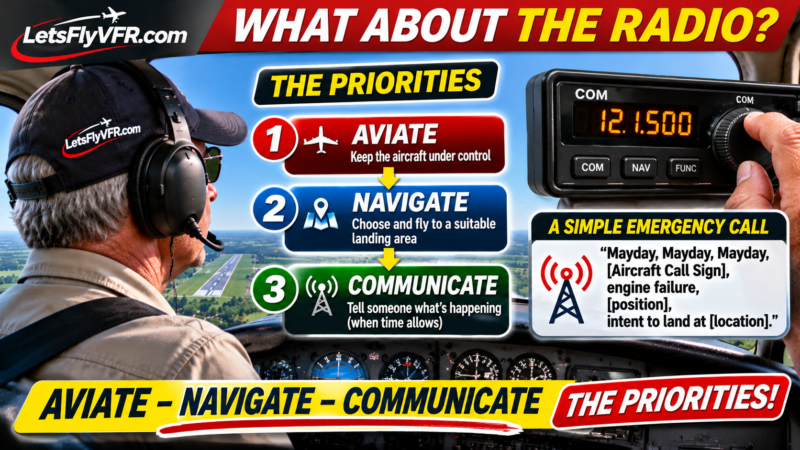
Its good practice to have 121.5 MHz selected as its the worldwide civil aviation emergency frequency (“Guard”) selected on your radios second channel. This allows you to monitor for emergencies as well as your own emergency calls if your not close to an airport etc.
Key aviation emergency frequencies:
- 121.5 MHz – Civil aviation emergency (VHF Guard) worldwide. [en.wikipedia.org], [skybrary.aero]
- 243.0 MHz – Military aviation emergency frequency (UHF Guard). [en.wikipedia.org], [skybrary.aero]
- 406 MHz – Modern emergency locator beacons (ELTs/EPIRBs) use the 406.0-406.1 MHz band.
For a distress emergency in U.S. aviation, MAYDAY is the standard distress call; the FAA also distinguishes PAN-PAN for urgency situations. (Federal Aviation Administration)
A simple simulator example might be:
“Mayday, Mayday, Mayday, Cessna 172, engine failure, 2 miles north of (Parafield YPPD) , 2,500 feet, landing Runway 23 Left.”
You don’t need to produce a perfect Hollywood radio transmission.
Communicate the important information.
Don’t Spend Five Minutes Making the Perfect Radio Call.
This is another simulator trap. The engine has failed so remain on the radio composing an elaborate radio message. Keep It Simple Stupid (KISS Principal).
Meanwhile:
Altitude: decreasing.
Airspeed: wrong.
Landing area: not selected.
Don’t do that! The radio is important but, it comes after controlling the aircraft.
Again – Aviate – Navigate – Communicate!
In this edition of Beyond the Specs, we’re putting those claims to the test.
- Beyond the Specs! A Flight Simmer’s Guide to Virtual Reality & Pimax VR.
- Beyond the Specs – The Ultimate Pimax VR Buyer’s Guide (2026).
- Beyond the specs – QLED vs Mini-LED vs Micro-OLED for Flight Simulation VR.
- Beyond the Specs. The Optics Behind VR.
- Beyond the Specs – Episode 4 – The Software Magic Behind Modern VR.
- Beyond the Specs. – GPU Overclocking Tested – Is It Really Worth It?
Engine Failure at 3,000 Feet.
Let’s create our first X-Plane 12 exercise. I would make this more realistic by adding an unknown factor to the exercise and set it up in the aircraft failures such as an engine failure for a time range or altitude range so its a bit more random but initially this is good practice.
But for now try:
Fly your Cessna 172 to approximately 3,000 feet AGL in a safe training environment.
Then:
Throttle to idle. Pretend the engine has failed. Don’t immediately restart it. Remember it takes you by surprise so its really going to take a few seconds to realise something is wrong – remember the correct action and start flying the aircraft for the situation!
Remember SULLY!
Now:
Step 1
Lower the nose.
Step 2
Establish best glide Vg.
Step 3
Look outside.
Step 4
Choose a landing area.
Step 5
Plan the approach.
Step 6
Only then consider the restart checklist.
This is an incredibly useful exercise.
What You’ll Discover.
You’ll probably discover something uncomfortable. The aircraft loses altitude quickly.
That’s the point!
You’re suddenly looking at the world differently. A field that looked close a moment ago may not be reachable. An airport that seemed nearby may be outside your glide range.
A road may look attractive but have obstacles. A runway may require a turn you can’t safely make.
This is why altitude is options.
The Higher You Are, the More Options You Have.
Obviously, this isn’t unlimited.
But generally, more altitude gives you more time and more potential landing areas.
At lower altitude:
Your choices disappear quickly.
That’s why one of the most important habits to develop is:
Always know where you could land if the engine stopped right now.
You don’t need to obsess over it.
But make it part of your normal situational awareness.
The 360-Degree Landing Scan.
Try this in X-Plane 12.
At altitude:
Look around.
Ask:
Ahead?
What could I land on?
Left?
What could I reach?
Right?
What could I reach?
Behind?
Is there an airport?
Is returning realistic?
You’re creating a mental map of your available options.
Engine Failure Over the Countryside.
This is an excellent training scenario.
Fly over an area with:
- Fields
- Roads
- Small towns
- Airports
Then simulate the engine failure. Don’t choose the landing site before the failure. Make the decision after the engine quits. That makes the exercise much more realistic.
Engine Failure Over a City!
Now make it harder.
Simulate an engine failure over an urban area. Your choices become more complicated.
You may have:
- Roads
- Open spaces
- Industrial areas
- Airports
- Parks – Golf course – Par 5 option.
- Fewer genuinely suitable landing areas
The objective isn’t to find the perfect landing.
It’s to find the best realistic option available & stay alive.
Engine Failure Near an Airport.
This is where pilots often make a dangerous assumption.
They think:
“The airport is right there. I’ll just turn back.”
But can you actually reach it?
From your current altitude?
With the current wind?
With the aircraft’s glide performance?
And without making an aggressive manoeuvre?
Don’t assume.
Calculate mentally and visually.
The Impossible Turn.
Now we get to one of aviation’s most famous traps.
You’re taking off.
You’re climbing.
And suddenly:
Engine failure.
The runway is behind you.
Your instinct says:
“Turn back!”
It sounds logical.
But it can be extremely dangerous & it kills pilots regularly in the real world to often. You see an aircraft take off – climb established then the noise stops – The pilot distracted turns the aircraft to return and it stalls then spins into the ground. This is TERMINAL!
The FAA describes the low-altitude turnback after an engine failure as the “impossible turn” and warns that attempting it without appropriate training and sufficient altitude can result in a stall, loss of control or impact with terrain. (Federal Aviation Administration)
Straight Ahead Is Often the Safer Starting Point.
Following an engine failure shortly after takeoff, the FAA says continuing generally straight ahead or with only a slight turn gives the pilot time to establish a controlled landing attitude and is usually the lowest-risk option, assuming the takeoff was into a headwind and suitable landing options exist ahead. (Federal Aviation Administration)
That’s very different from the instinctive:
“Get back to the runway!”
Why Is the Turnback So Difficult?
You’re starting with:
Low altitude.
You have:
No engine power.
You need:
A large change in direction.
And you’re also trying to maintain:
Best glide speed.
If you turn too aggressively without proper training, you can lose a huge amount of altitude. You can also induce a Spin from excessive rudder causing Adverse Yaw which causes the high wing to stall then the aircraft drops spinning towards what was the high wing in the initial turn. Read more about ADVERSE YAW here .. Please!
The FAA’s example illustrates just how quickly altitude can disappear during a turnback manoeuvre. (Federal Aviation Administration)
This Is Not a Simulator Trick.
Don’t treat the impossible turn as a fun stunt. This is one of the areas where simulator training can actually reinforce dangerous habits if you approach it incorrectly.
You need to have a line in the altitude where NO MATTER what happens you land ahead! Before you take off you should say to yourself and co-pilot / friends – If the engine stops below 1000ft we will be attempting to land ahead on the …. highway – Field directly ahead – Golf course etc! If we are above 1000 Ft AGL we will return to the airport and land.
You MUST HAVE A PLAN! Saying it allowed makes it a plan!
Don’t learn:
“I can always turn back.”
Learn:
“A turnback is only an option if I know the aircraft can make it.”
The FAA recommends that pilots who consider turnback manoeuvres know the aircraft’s expected altitude loss, practise the manoeuvre at a safe altitude, and understand whether the aircraft can physically reach the runway. (Federal Aviation Administration)
The X-Plane 12 Turnback Experiment.
If you want to explore this safely in the simulator, don’t start at 300 feet and immediately try to save yourself.
Start high, much higher and practise the aircraft’s glide and turning performance. Then you will understand how far you can glide. This is why instructors will randomly remove power and say – Your Engine Quit – Now what are you going to do? Its random and unexpected!
Then progressively simulate failures at different altitudes.
The objective isn’t:
“Can I make it back?”
The objective is:
“At what point does returning become unrealistic?”
That is much more valuable information.
Don’t Stretch the Glide.
We’ve mentioned this already, but it deserves repeating.
Once you’ve selected a landing field you’re slightly short then you pull back then the aircraft slows. You hope the glide improves but it doesn’t. You are now even closer to a stall.
The FAA explicitly warns against trying to stretch a glide by raising the nose because it can result in a stall or landing short. (Federal Aviation Administration)
The correct response is:
Protect the airspeed.
Then manage your approach.
But Don’t Dive at the Field Either.
The opposite mistake is equally bad.
You’re high & You think:
“I need to get down.”
So you push the nose down.
Now you’re fast & you reach the field with excessive speed which means you have too much energy to land safely.
This is where a Sideslip technique can save the day. You can maintain your desired speed, cross the controls and rudder causing the aircraft to descend under control and not dive at your desired landing point. You balance a right roll with aileron but push left on the rudder and th balancing of these makes the aircraft descend fast but controlled which can be adjusted to increase or decrease all the while maintaining a safe flying speed.
The FAA’s emergency-landing guidance specifically notes that arriving with too much speed can be just as problematic as arriving too slowly. (Federal Aviation Administration)
The Perfect Emergency Approach’
You’re looking for a controlled glide.
You want to arrive:
At the appropriate speed.
At the appropriate altitude.
Aligned with the landing area.
With enough energy to reach it.
But not so much energy that you cannot land safely. That’s energy management again. The same skill we’ve been practising throughout this series.
You Still Have to Fly the Circuit.
Here’s where this article connects to everything we’ve already done. If you’re landing at an airport after an engine failure, you’re still thinking about:
Downwind
Base
Final
Aiming point
Altitude
Speed
Runway
The difference is:
You don’t have the engine.
So your ability to adjust the flight path is much more limited.
High Key & Low Key Altitudes.
For a Cessna 172, there’s no official POH “high key” and “low key” because those are military/glider emergency landing concepts. However, many instructors use roughly:
- High Key: 2,000 ft AGL abeam the intended landing point.
- Low Key: 1,000 ft AGL on the downwind/base position.
- Base Key: 500 ft AGL turning final.
I have practiced this from about 5 kilometers from my own YGAW Gawler airport and was so surprised that I could fly from 5000Ft @ 5 Kilometers north of the field and using the High Key / Low key concept as well as Vg speed in the Jabiru 170 we still managed to fly in, downwind leg, base and land safely without adding power. It was quite eye opening how far we could fly.
A simple emergency pattern for a 172 at 68 KIAS (best glide) is:
- High Key – 2,000 ft AGL
- Descend in a 360° or modified circuit
- Low Key – 1,000 ft AGL
- Turn base
- Final – 500 ft AGL or lower
For X-Plane 12, a practical rule is:
- Above 2,000 ft AGL: fly to a High Key position over or abeam the landing area.
- At 1,000 ft AGL: be established on a normal emergency circuit.
- Use slips and flaps only when you’re certain you’ll make the field.
The classic saying is:
“Always keep the field made.”
In a C172, it’s much easier to lose excess altitude (slip, S-turns, flaps) than to regain it after an engine failure. So during practice, arrive slightly high rather than slightly low.
Here is where you need to remember some additional information which we have covered recently in anothe Letsflyvfr.com blog on High Key & Low Key in a circuit.
The Emergency Circuit.
Imagine you’re gliding toward an airport. You don’t want to simply point the nose at the runway. You need to manage your altitude.
If you’re too high:
You may need to extend the pattern or use appropriate drag techniques according to the aircraft’s procedures.
If you’re too low:
You need to protect your ability to reach the field.
The FAA notes that pilots can adjust glide angle and altitude during simulated emergency approaches using techniques such as slipping, flaps and changing base/final geometry, while maintaining appropriate control. (Federal Aviation Administration)
The Biggest Mistake During an Engine-Out Landing.
You get excited because you’re going to make the runway.
Then you start thinking about:
“Where exactly am I going to touch down?”
Too early.
Your first objective is:
Make the landing area.
Then:
Control where within that area you land.
Don’t sacrifice reachability just to improve your touchdown point.
Pick a Touchdown Area.
Once you’re confident you can reach the field, pick a specific area.
For a runway:
Choose an appropriate touchdown zone.
For a field:
Identify the safest portion.
Then keep assessing.
But don’t obsess over perfection.
A survivable landing somewhere appropriate is better than an elegant landing somewhere you can’t reach.
What If the Engine Suddenly Restarts?
Great. But don’t immediately abandon your landing plan. Make sure the engine is actually producing reliable power.
Then reassess.
If you’ve already committed to an emergency landing and the engine only briefly coughs back into life, you still need to make a safe decision.
Don’t suddenly yank the aircraft around because you think you’re saved.
Engine Failure Doesn’t Always Mean Total Silence.
An engine can lose partial power.
You may experience:
- Rough running
- Reduced RPM
- Loss of manifold pressure
- Intermittent power
- Smoke
- Vibrations
- Abnormal engine indications
The response depends on the actual problem and aircraft.
That’s another reason the correct aircraft-specific checklist matters.
For this series, we’re primarily using a complete simulated power loss because it makes the training objective clear.
Your First Serious X-Plane 12 Challenge.
Let’s make this a proper LetsFlyVFR challenge.
Aircraft
Cessna 172
Weather
Daytime VFR.
Wind
Light initially.
Altitude
Around 3,000 feet AGL.
Location
Somewhere with plenty of potential landing areas.
Then:
Engine failure.
Challenge One — Can You Reach an Airport?
Fly somewhere near an airport.
Don’t position yourself directly above the runway.
Simulate the engine failure.
Now ask:
Can I reach it?
Don’t use the GPS to cheat.
Use your visual judgement.
Challenge Two — Can You Pick a Field?
Now fly over countryside.
Engine failure.
Choose a field.
Don’t change your mind repeatedly.
Fly the glide.
Try to make the field.
Then reset.
Challenge Three — Can You Fly the Emergency Circuit?
Start near an airport.
Simulate engine failure.
Choose the runway.
Fly a gliding circuit.
Manage:
Altitude
Airspeed
Position
Turns
Final
Then land.
Challenge Four – The Impossible Turn.
Now we get more advanced.
At a safe altitude, simulate an engine failure after takeoff.
Practise the turnback only as a controlled simulator training exercise.
Repeat it at different starting altitudes.
Record:
Altitude at failure
Altitude after the manoeuvre
Distance from runway
Final position
You’ll quickly discover that the answer isn’t:
“Always turn back.”
The answer is:
“Know whether your aircraft can make the turn.”
Challenge Five – Add Wind and Clouds.
Now add a crosswind.
Repeat the exercise.
Notice how the wind changes your ground track and landing options.
Then try a tailwind component.
Now your glide distance over the ground changes.
The FAA notes that wind affects gliding distance: a tailwind increases groundspeed and can increase distance covered over the ground, while a headwind reduces it. (Federal Aviation Administration)
Challenge Six – Make It Uncomfortable.
Now try an engine failure:
Over unfamiliar terrain.
Don’t panic.
Look.
Choose.
Commit.
Fly.
This is the real skill.
Your Engine-Out Checklist
For the simulator exercise, use this as a memory framework, not a substitute for the aircraft’s actual emergency checklist:
FLY
Establish control and the appropriate best-glide speed.
LAND
Select the best available landing area.
COMMUNICATE
Make the appropriate emergency call when workload permits.
RESTART
Use the aircraft-specific emergency/restart checklist if time and altitude permit.
PREPARE
Configure the aircraft appropriately for the landing.
LAND
Fly the selected area and maintain control through touchdown and rollout.
What You Should NOT Do!
Don’t:
❌ Pull the nose up to stretch the glide.
❌ Turn back automatically after takeoff.
❌ Spend the first few seconds staring at engine gauges.
❌ Change landing areas constantly.
❌ Dive at the landing field.
❌ Make aggressive low-altitude turns.
❌ Chase the perfect touchdown point.
❌ Assume the runway is reachable because it looks close.
❌ Invent emergency procedures from memory.
❌ Continue troubleshooting while losing control of the aircraft.
The Most Important Skill Is Decision Making.
Notice something?
The aircraft control itself isn’t necessarily the hardest part.
The hardest part is deciding:
Where am I going?
Can I reach it?
Should I change my plan?
Do I have enough altitude?
Should I attempt the restart?
Should I make a radio call?
Should I commit to this field?
That’s why we’re practising this in X-Plane 12.
You can make those decisions repeatedly.
Why Simulator Pilots Should Practise Engine Failures.
Because simulators remove the fear.
You can:
Fail the engine.
Try.
Get it wrong.
Crash.
Reset.
Try again.
Change the altitude.
Change the wind.
Change the airport.
Try again.
And eventually, your response becomes much more automatic.
That’s extremely valuable training.
The Engine Failure Should Become Boring.
That might sound strange.
But that’s actually the goal.
If the engine stops and your brain immediately goes:
“Okay.”
Then:
Best glide.
Where can I land?
Can I reach that field?
Radio.
Restart checklist.
Plan the landing.
You’ve made enormous progress.
The emergency hasn’t disappeared.
Your reaction to it has improved.
The Real Test.
Here’s your test.
Fly normally in X-Plane 12.
Then, without warning yourself beforehand, simulate the engine failure.
Can you immediately:
1. Lower the nose?
2. Establish best glide?
3. Look outside?
4. Select a landing area?
5. Assess whether you can reach it?
6. Communicate?
7. Run the appropriate restart procedure?
8. Fly the approach?
9. Land?
If yes:
Excellent.
If not:
You now know exactly what needs practising.
The LetsFlyVFR Engine Failure Challenge.
Let’s make this one official.
LEVEL 1 – Cruise Failure
Engine failure at altitude.
Objective: Establish best glide and select a landing area.
LEVEL 2 – Airport in Sight
Engine failure near an airport.
Objective: Determine whether the runway is reachable.
LEVEL 3 – Forced Landing
Engine failure over countryside.
Objective: Select and land in a suitable field.
LEVEL 4 – Emergency Circuit
Engine failure near an airport.
Objective: Fly a controlled gliding pattern.
LEVEL 5 – Turnback
Engine failure after takeoff.
Objective: Explore the turnback decision at safe simulator training altitudes.
LEVEL 6 – Wind
Repeat the exercises with different wind conditions.
LEVEL 7 – Unknown Terrain
Engine failure over unfamiliar scenery.
Objective: Make the best decision with limited time.
One Rule Above All Others!
If you remember nothing else from this article, remember this:

FLY THE AIRCRAFT FIRST.
The engine has failed.
That’s already happened.
You cannot fix the past.
But you can control what happens next.
Fly.
Choose.
Communicate.
Troubleshoot.
Land.
This Is Where VFR Training Gets Serious.
We’ve spent the earlier articles learning:
How to taxi
How to use the radio
How to perform a run-up
How to enter the runway
How to judge an approach
How to fly a circuit
How to stop floating
How to correct the base turn
How to fly a challenging airport
Now we’re adding something completely different:
What happens when the plan suddenly disappears?
Because that’s what an emergency really is.
The aircraft stops doing what you expected.
And your job is to build a new plan.
What’s Next?
Now that we’ve introduced engine failure, we’re going to make the emergency training progressively harder.
Because an engine failure at 3,000 feet over open countryside gives you options.
An engine failure at 500 feet after takeoff is a very different problem.
And that’s where we’re going next.
ENGINE FAILURE AFTER TAKEOFF — WHAT WOULD YOU DO?
You’ve just lifted off.
The runway is behind you.
You’re climbing.
And suddenly:
The engine quits.
Do you land ahead?
Do you turn?
How much altitude do you need?
When is turning back actually possible?
And why is the famous “impossible turn” so dangerous?
That’s the next challenge.
A Critical Real-World Note
This article is written primarily as an X-Plane 12 simulator training exercise.
Real engine-failure procedures are aircraft-specific. The correct emergency checklist, best-glide speed, restart procedure, flap/gear configuration, turnback criteria and forced-landing procedures must come from the aircraft’s approved operating information and qualified flight instruction.
The FAA specifically emphasises aircraft control, best-glide performance, landing-area selection and appropriate decision-making during simulated emergency landings. It also warns that low-altitude turnbacks after takeoff are hazardous and should not be attempted without appropriate training and a demonstrated ability to complete the manoeuvre in that aircraft. (Federal Aviation Administration)
Do not use this article as a substitute for real-world flight instruction or your aircraft’s emergency checklist.
The Engine Has Quit.
Now stop thinking about the engine.
Fly the aircraft.
Find somewhere to land.
Make the decision.
And fly the plan.
Learn the emergency. Practise the response. Build the judgement. Become a better virtual pilot.
LetsFlyVFR – Learn, Explore and Enjoy the World of Flight Simulation!
Author
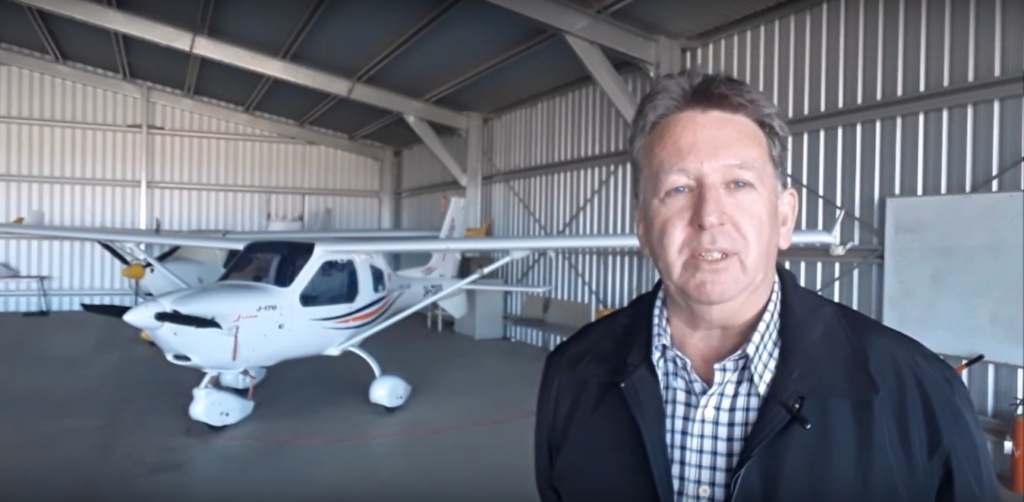
Brendon McAliece (Aka Gunnie) is a military veteran with 23 years working on Jet Fighters, their weapons systems and ejection seat/module systems as well as munitions and R&D. Involved with flight simulation since the 1980s, he has flown all the major flight simulators over the years.
He is an Australian expat who has lived in Malaysia, UK, Saudi Arabia and more recently Thailand. He is a multi-lingual blogger who loves to share his life experiences here on LetsFlyVFR.com and DreamingGuitar.com, with his lifestyle and Travel experiences Blog plus his Dreaming Coffee website.
Learn More @
DreamingGuitar.com – DreamingCoffee.com
LetsFlyVFR ETSY Store – Discover PIMAX VR Now!

Leave a Reply