
A Beginner’s Guide! Easy Guide!
Ready to move up from a single-engine Cessna? Learn how to start the Beechcraft Baron 58 twin-engine aircraft in X-Plane 12, with a beginner-friendly cockpit walkthrough and step-by-step engine start procedure.
Welcome back to LetsFlyVFR!
If you’ve been learning to fly the Cessna 172 in X-Plane 12, perhaps it’s time to take the next step.
Today we’re moving into something a little more exciting: the Beechcraft Baron 58.
The Baron is a beautiful twin-engine aircraft, offering considerably more performance and complexity than the Cessna 172. It also introduces some important new skills, including managing two engines, constant-speed propellers, dual throttle controls and separate engine instruments.
Don’t let that put you off!
We’ll take things one step at a time, starting with the cockpit, getting the aircraft ready, starting each engine and completing our after-start checks.
By the end of this tutorial, you’ll have a much better understanding of how to bring the Baron 58 to life in X-Plane 12.
So, let’s get started!
BUILD THE PERFECT COCKPIT… THEN DRESS THE PART.
Discover Premium Flight Simulator Apparel, Wall Art, Pilot Gifts and Aviation Accessories at LetsFlyVFR – ETSY STORE.






1. Getting to Know the Beechcraft Baron 58.

The Beechcraft Baron 58 is a six-seat, low-wing, twin-engine aircraft.
The standard X-Plane 12 Laminar Research Baron is modelled with two Continental IO-550-C engines, each producing 300 horsepower.
Unlike the Cessna 172, which has one engine and a relatively straightforward control arrangement, the Baron has two complete engine control sets.
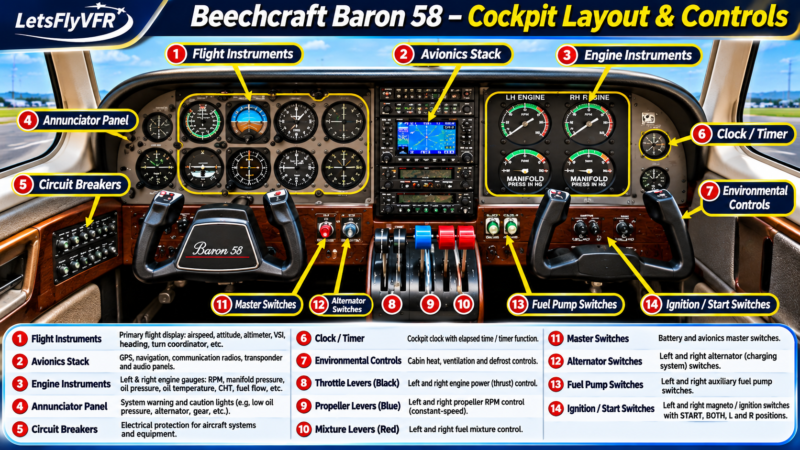
That means you’ll need to manage:
- Two throttle controls.
- Two propeller controls.
- Two mixture controls.
- Two ignition/magneto switches.
- Two alternator switches.
- Separate engine instruments.
The aircraft also features retractable landing gear and constant-speed propellers.
The important difference: You aren’t simply starting one engine and going flying. You’ll need to start and monitor each engine individually.
2. Familiarising Yourself with the Cockpit.
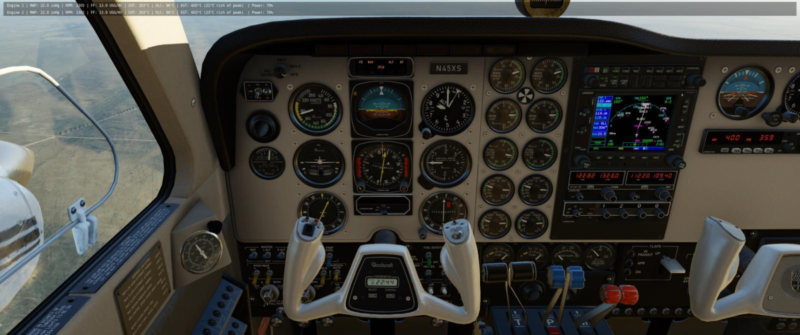
Before starting, take a few minutes to familiarise yourself with the cockpit.
The Baron has a traditional instrument layout with a central avionics stack and a dedicated engine instrumentation area.
The most important controls for starting are:
Throttle levers – Black
These control engine power for the left and right engines.
Propeller levers – Blue
These control propeller RPM by changing the blade pitch.
Mixture levers – Red
These control the fuel-to-air mixture supplied to each engine.
Magneto/Start switches
These control the ignition systems and starter motors.
Master Battery Switch
Supplies electrical power to the aircraft systems.
Alternator switches
Control the charging systems for the individual engines.
Fuel pump switches
Provide fuel pressure when required by the aircraft’s systems and procedures.
Take a moment to locate these controls before proceeding.
Remember, the Baron has two engines, so you will be repeating much of the starting process for the second engine.
3. Before Starting – Cockpit Preparation.
Before starting the engines, we need to make sure the aircraft is correctly configured.
For the standard X-Plane 12 Baron, the Laminar Research Pilot’s Operating Manual provides the following simulation checklist.
| Item | Action |
|---|---|
| Exterior inspection | COMPLETE |
| Parking brake | ON |
| Power levers | SLIGHTLY FORWARD |
| Propeller levers | FULL FORWARD |
| Mixture levers | FULL FORWARD |
| All switches | OFF |
| Battery switch | ON |
| Fuel quantity | CHECK |
| Annunciator panel | CHECK WARNING LIGHTS |
Take particular notice of the three engine control groups.
The black throttle levers, blue propeller levers and red mixture levers all have different functions.
Getting familiar with these now will make the engine starting procedure much easier.
4. Starting the First Engine – Left Engine.
Now we’re ready to start our first engine.
For this tutorial, we’ll follow the simulation-specific procedure in the Laminar Research Baron 58 manual.
Step 1 – Master Battery
Check that the MASTER BATTERY switch is ON.
This supplies electrical power to the aircraft.
Step 2 – Avionics
Ensure the AVIONICS MASTER is OFF during engine starting.
This helps protect the avionics from electrical fluctuations during the starting process.
Step 3 – Left Alternator
Switch the LEFT ALTERNATOR ON.
Step 4 – Left Magneto / Start
Turn and hold the LEFT MAGNETO switch in the START position until the engine is running.
Watch the engine instruments as the engine comes to life.
Step 5 – Left Throttle
Once the engine is running, bring the LEFT POWER LEVER back to IDLE.
Step 6 – Left Magneto
Move the LEFT MAGNETO switch to BOTH.
Your left engine should now be running.
Congratulations! That’s your first engine started.




Get your Pimax / LetsFlyVFR Discount on all VR units with the links above or use VFR Code at the checkout to save 2% Today!
5. Starting the Second Engine – Right Engine.
Now we repeat the process for the right engine.
The procedure is very similar, but make sure you’re operating the correct controls.
Step 1 – Right Alternator
Switch the RIGHT ALTERNATOR ON.
Step 2 – Right Magneto / Start
Turn and hold the RIGHT MAGNETO switch in the START position until the engine is running.
Step 3 – Right Throttle
Once the engine is running, bring the RIGHT POWER LEVER back to IDLE.
Step 4 – Right Magneto
Move the RIGHT MAGNETO switch to BOTH.
Both engines should now be running!
You are now operating a twin-engine aircraft.
Take a moment to check the engine instruments and make sure both engines are operating normally.
6. After Starting – Engine Checks.
Now that both engines are running, we need to check that everything is operating correctly.
Pay particular attention to the following:
| Item | Check |
|---|---|
| Left engine | Running normally |
| Right engine | Running normally |
| Oil pressure | CHECK |
| Engine temperatures | CHECK |
| Engine RPM | CHECK |
| Alternator indications | CHECK |
| Electrical system | CHECK |
| Warning lights | CHECK |
Remember that the Baron has two engines, so you need to monitor both sets of engine instruments.
Don’t assume that because one engine is operating correctly, the other must be as well.
7. Before Taxiing

With both engines running and the instruments showing normal indications, we can move on to the before-taxi checks.
According to the X-Plane Baron manual:
| Item | Action |
|---|---|
| Landing gear | DOWN |
| Flaps | RETRACTED |
| Avionics master | ON |
| Lights | AS REQUIRED |
| Radios | AS REQUIRED |
| Transponder | ON AND SET |
Check your flight instruments and set your radios for the departure airport.
Make sure you understand the aircraft’s taxi handling before releasing the parking brake.
The Baron is a larger and heavier aircraft than the Cessna 172, so allow yourself time to get used to its ground handling.
8. Important Differences Between the Cessna 172 and Baron 58.
If you’ve already learned to fly the Cessna 172, you’ll recognise many of the controls in the Baron.
However, there are some important differences.
| Feature | Cessna 172 | Baron 58 |
|---|---|---|
| Engines | One | Two |
| Throttles | One | Two |
| Propeller controls | Fixed-pitch on standard trainer versions | Constant-speed |
| Mixture controls | One | Two |
| Ignition | One switch | Separate engine controls |
| Alternators | One | Two |
| Landing gear | Fixed on standard C172 | Retractable |
| Engine monitoring | One engine | Two engines |
The biggest lesson is learning to manage both engines independently.
You must monitor engine performance, temperatures, pressures and RPM for both sides.
This is an important part of becoming comfortable with twin-engine aircraft.
9. Ready for Your First Baron 58 Flight?
Congratulations!

You’ve now worked through the basic cockpit preparation, started both engines and completed the initial after-start checks.
The next stage is taxiing, completing the run-up checks and preparing for takeoff.
If you’re new to twin-engine aircraft, take your time.
Learn the cockpit, understand the controls and develop good habits before moving on to more advanced flying.
The Baron 58 is a fantastic aircraft to learn in X-Plane 12, and it opens the door to a whole new level of flight simulation.
Twin Engine Dangers – You Need to Know!
The Critical Engine – A Hidden Danger of Twin-Engine Aircraft
The Baron 58 and other multi-engine aircraft can have some unique dangers, particularly when dealing with an engine failure.
When flying a twin-engine aircraft, losing one engine creates a very different situation from losing the engine in a single-engine aircraft. Although both situations are serious, the position of the engines and the direction in which their propellers rotate introduce additional aerodynamic challenges.
When one engine fails, the remaining engine continues producing thrust on only one side of the aircraft. This creates asymmetric thrust, causing the aircraft to yaw towards the failed engine.
Propeller rotation also plays an important role. Factors such as P-factor, propeller slipstream and the position of the effective thrust line can make one engine more critical than the other.
This is why some twin-engine aircraft have a designated Critical Engine.
Aircraft designers can reduce or eliminate this particular disadvantage by using counter-rotating propellers, where the propellers rotate in opposite directions.
This is an important concept for anyone moving from a single-engine aircraft such as the Cessna 172 to a twin-engine aircraft like the Beechcraft Baron 58.
I highly recommend reading more about this subject here:
Read more – Critical Engine (Wikipedia)
Twin Engine X Plane 12 Options.
X-Plane 12 has a number of both free included aircraft as well as payware and more free mods online to explore such as the Diamond – DA-62 – Piper PA-30 Piper Comanche – Beechcraft King Air C90 – Douglas DC-3 (C47) and more!
Final Thoughts
Moving from a Cessna 172 to a Beechcraft Baron 58 is a big step for any virtual pilot.
You now have two engines to manage, two sets of instruments to monitor and a much more complex aircraft to operate.
But that’s all part of the fun!
Take things slowly, practise the procedures and enjoy learning something new.
Happy flying, and I’ll see you in the skies!
More Flight Simulation Tutorials.
Visit LetsFlyVFR.com for more X-Plane 12 tutorials, aircraft information, flight simulation guides and tips.
Subscribe to our YouTube channel, LetsFlyVFR, for more flight simulation tutorials and adventures.
Important Disclaimer
This article is intended for X-Plane 12 flight simulation and general educational purposes only.
The starting procedure described here follows the simulation-specific checklist supplied in the Laminar Research Beechcraft Baron 58 Pilot’s Operating Manual. That manual expressly states that it is intended for simulator use and has not been verified for real-world flight.
This article is not an approved aircraft checklist or a substitute for actual flight training, aircraft documentation or an approved Pilot’s Operating Handbook.
Always consult the correct aircraft documentation and follow the applicable procedures.
LetsFlyVFR – Learn, Explore and Enjoy the World of Flight Simulation!
Author
Brendon McAliece (Aka Gunnie) is a military veteran with 23 years working on Jet Fighters, their weapons systems and ejection seat/module systems as well as munitions and R&D. Involved with flight simulation since the 1980s, he has flown all the major flight simulators over the years.
He is an Australian expat who has lived in Malaysia, UK, Saudi Arabia and more recently Thailand. He is a multi-lingual blogger who loves to share his life experiences here on LetsFlyVFR.com and DreamingGuitar.com, with his lifestyle and Travel experiences Blog plus his Dreaming Coffee website.
Learn More @
DreamingGuitar.com – DreamingCoffee.com
LetsFlyVFR ETSY Store – Discover PIMAX VR Now!

Leave a Reply